Adding licenses and statuses to a resource
You can add licenses records and statuses to a resource on the Acquisitions tab of the resource record. Licenses and statuses help you keep track of your agreements for a resource. Licenses must be created in the Licenses module before they can be associated with a resource (for more information , see). You can configure the licensing statuses that are available in your system on the Resources module Admin page (for more information, see License Statuses).
To add licenses or statuses to a resource
- From a resource's Details page, select the Acquisitions tab.
- Click Edit License and Status.
-
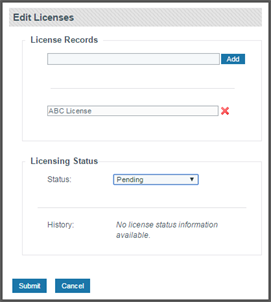
Type the name (or part of the name) of the license in the License Records field, then select the license from the list of options and click Add.
Note: For more information about each of these fields, see Fields: Adding licenses and statuses.
- Select a status from the Licensing Status drop-down list.
- Click Submit.
Thanks for your feedback!