Importing report files
You can perform manual imports of statistical report files that match JR1, BR1, BR2, and DB1 COUNTER formats from the File Import page. After performing an import, the platforms included in the report file are created automatically in the system if they have not already been added.
The COUNTER report files that you download from your provider's site often contain additional text that needs to be deleted before the system can perform the import. The system expects the first line of the report to be the column names, followed by additional lines that conform to the COUNTER standard for your report type (for more information, see the COUNTER website at http://www.projectcounter.org/). For example, a report that has just been downloaded from a provider site could be formatted like this:
"Journal Report 1 (R4)" "Number of Successful Full-text Article Requests by Month and Journal"
"SirsiDynix"
"Period covered by Report:"
"2016-01-01 to 2016-01-31"
"Date run:"
"2016-02-05"
Journal Publisher Platform Journal DOI Proprietary Identifier Print ISSN Online ISSN Reporting Period Jan-2015
Total for all Journals Sample EJournal Platform 7
AANA Journal American Association of Nurse Anesthetists Sample EJournal Platform 305 0094-6354 3
ABA Journal American Bar Association Sample EJournal Platform 351 0747-0088 2162-7983 4
After making our changes to remove all of the intro text that precedes the column names, our report would be formatted like this:
Journal Publisher Platform Journal DOI Proprietary Identifier Print ISSN Online ISSN Reporting Period Jan-2015
Total for all Journals Sample EJournal Platform 7
AANA Journal American Association of Nurse Anesthetists Sample EJournal Platform 305 0094-6354 3
ABA Journal American Bar Association Sample EJournal Platform 351 0747-0088 2162-7983 4
To import a report file
- From any page in the Usage Statistics module, click File Import from the navigation bar.
-
Click Choose File and locate the report file you want to import.
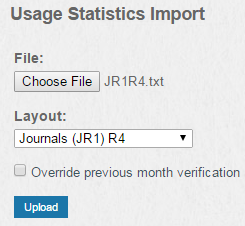
- Select the COUNTER layout for your report from the Layout drop-down list.
- If you want to override statistics from a previous month with more current information, select Override previous month verification.
- Click Upload.
- Verify the contents of your statistical data displayed on the screen, then click Confirm.
Thanks for your feedback!